Watch me build a mission control for Hermes step by step: a dashboard tab, an hourly watchdog, a boot check, phone alerts on Telegram and a free dead-man's switch. Then install Mission Control v4, 18 views of your own agents, free and read-only until you say so.
Join now and you stay in for free. The price goes to $97/month when the free window closes ($147 at 200 members).
Join the Skool community free →Everyone's selling an AI operating system you have to hook up to your keys and trust. Meanwhile, a job fails at 3 a.m. and nothing on your screen tells you. In this class, my own backup check failed on its very first run, and we build everything you need so a red light like that can't hide from you again.
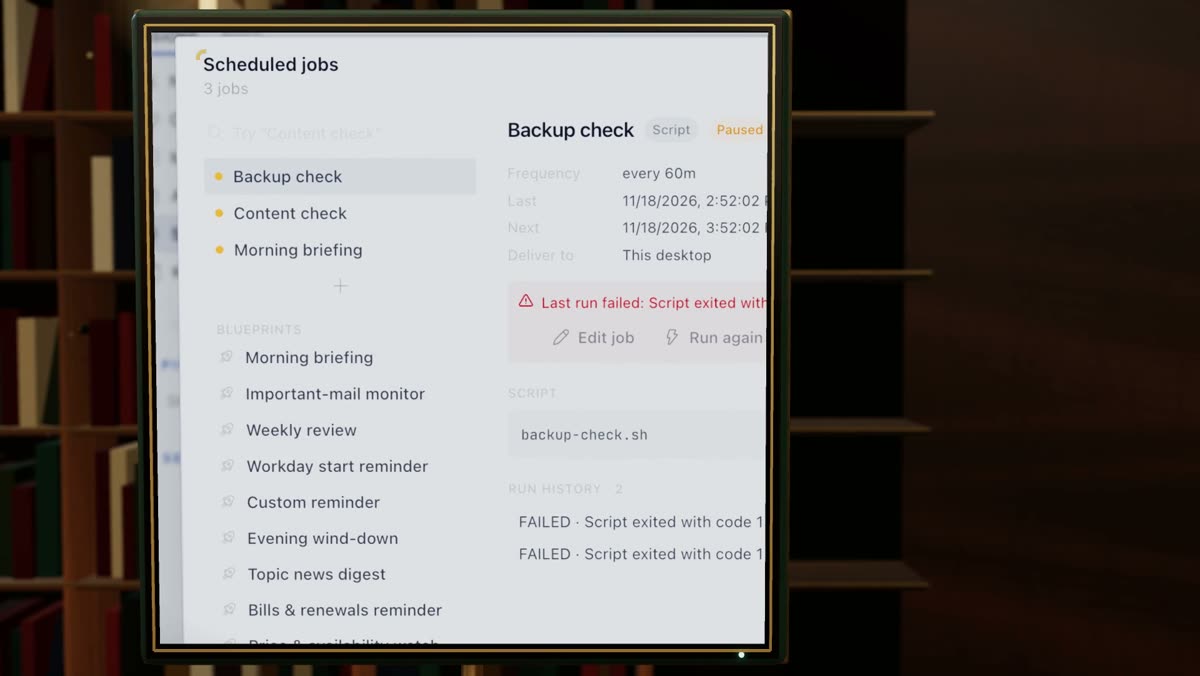
Tour the Hermes desktop app, turn on the 10 hidden status-bar items, and spot a failed job in one click.
Ask Hermes to build a read-only Mission Control tab, then upgrade it to version two and into the desktop app.
A cron job that stays silent when everything's healthy and speaks up the moment something breaks.
Send the watchdog's alerts to Telegram, plus a boot check that tells you if Hermes came back healthy.
A free Healthchecks.io check that emails you when Hermes itself goes quiet. It uses no AI, so it spends no model tokens.
18 views of your real agents, from the 3D Olympus Agora to the Kanban Deck, Security Doctor and the red emergency stop.
My practice backup check failed on its very first run, and hermes cron doctor still said no issues. Doctor skips paused jobs, so a green doctor isn't proof that everything's fine.
Clicking Trigger now to test the paused backup job quietly switched it back on. The class shows you to click Pause right after every test.
The first version of the dashboard Hermes built said "NaN days ago" next to every run. Hermes found the problem right away, and it was a one-line fix.
Join the Skool community, open Classroom → Hermes AI Agent Class → Class 22, and the files are at the bottom of the lesson.
Get the files free →Counts as of 2026-11-27, from the Skool classroom, the public YouTube channel page and the Skool About page.
“I have successfully installed OpenClaw on AWS by follow your instructions. Thanks a lot!!”
“this is the best tutorial. out there!!!”
“Very good video!”

I build real AI agents on camera and show every click, every cost and every mistake, so you can copy what works. Hermes is free and open source, and in my opinion it's the best AI agent to build on right now. My Skool community is where all the classes, files and prompts live.
Yes. Joining the Skool community is free right now, for a limited time. Join now and you stay in for free. The price goes to $97/month when the free window closes ($147 at 200 members).
No. The classes are built in the Hermes desktop app, and you set most things up by asking the agent in chat. Every command and prompt is in the downloadable files.
Hermes and Mission Control are free. You pay for the AI model Hermes uses, for example through OpenRouter, or you can use a subscription you already have. In the class, the hourly watchdog cost about a quarter of a cent a run, building the dashboard came to about forty cents, and the Healthchecks.io free plan is $0 a month.
No. It starts read-only, so it can look at everything and change nothing. You switch Control mode on yourself, every action asks you to confirm, and Control mode switches back off when you reload the page.
Inside Skool, start at the first Hermes class. Every class builds on the last one, and they're all included.
Join the Skool community free, grab Mission Control 4.5.0 and the Class 22 practice files, and get every other Hermes class with them.